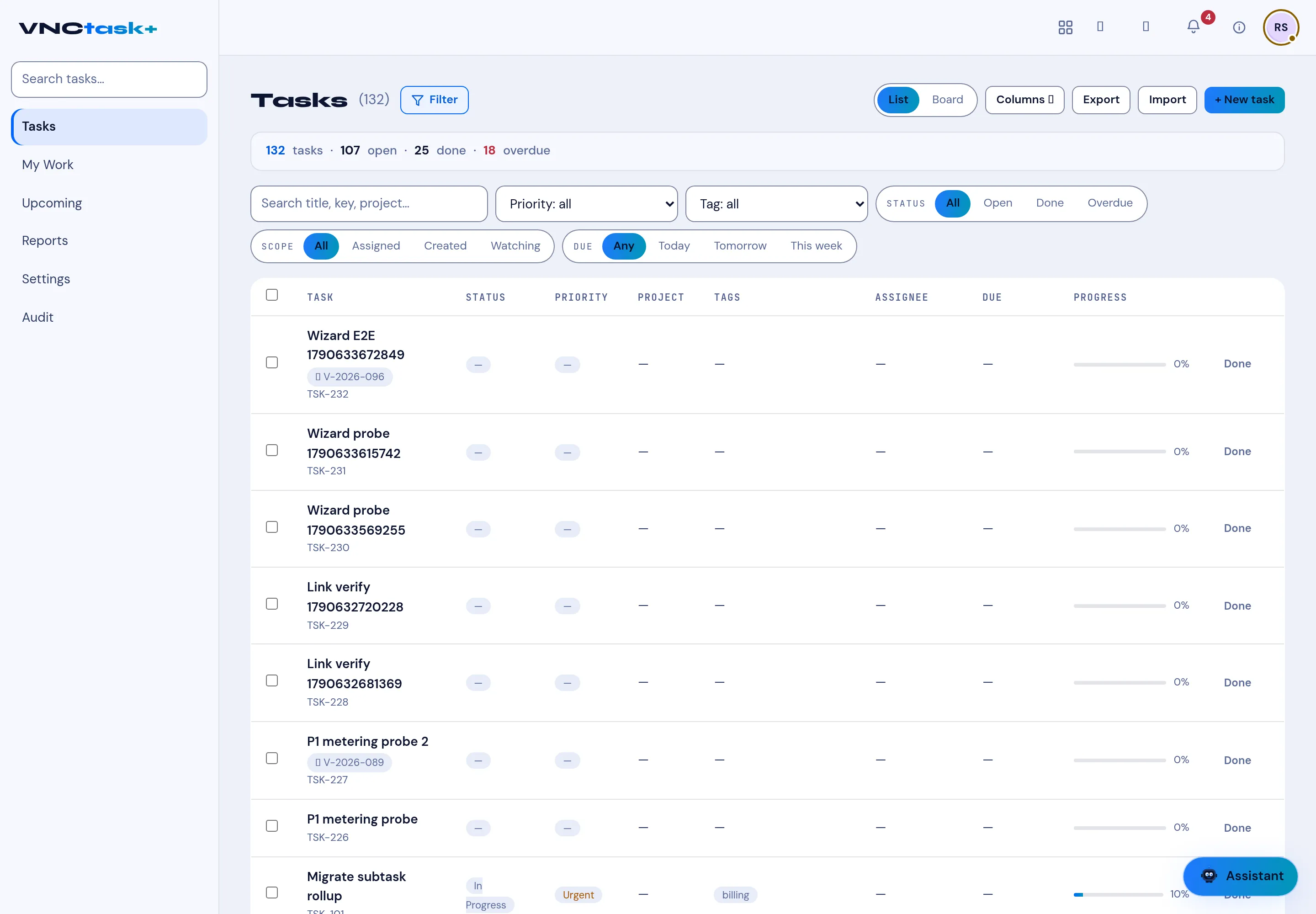
The task list
Tasks is the full list of work assigned to you and your teams.
Header
Section titled “Header”- Tasks (n) — the total, and Filter to narrow it.
- List / Board — switch between the table and columns.
- Columns — choose which columns show.
- Export / Import — take the list out or bring tasks in.
- + New task — create one — see Create a task.
The summary line counts the list, for example 126 tasks · 101 open · 25 done · 16 overdue.
Columns
Section titled “Columns”| Column | Shows |
|---|---|
| Task | Title, the task ID (TSK-xxx) and, for a subtask, a marker with its parent. |
| Status | New, In progress, Blocked, Done, … — see Statuses and priority. |
| Priority | Low, Normal, High, Urgent. |
| Project | The project the task belongs to. |
| Tags | Labels such as ux, frontend, billing. |
| Assignee | Who owns it. |
| Due | The due date. |
| Progress | A bar plus percent. |
Workflow chips
Section titled “Workflow chips”A task that was sent for approval shows a workflow chip — the request’s
reference (V-YYYY-NNN) — under its task ID, next to the status. Click it to open
the request in VNCworkflow. See
Start a workflow from any item.
The sidebar switches the set: Tasks, My Work, Upcoming, Reports, Settings and Audit.