The left navigation
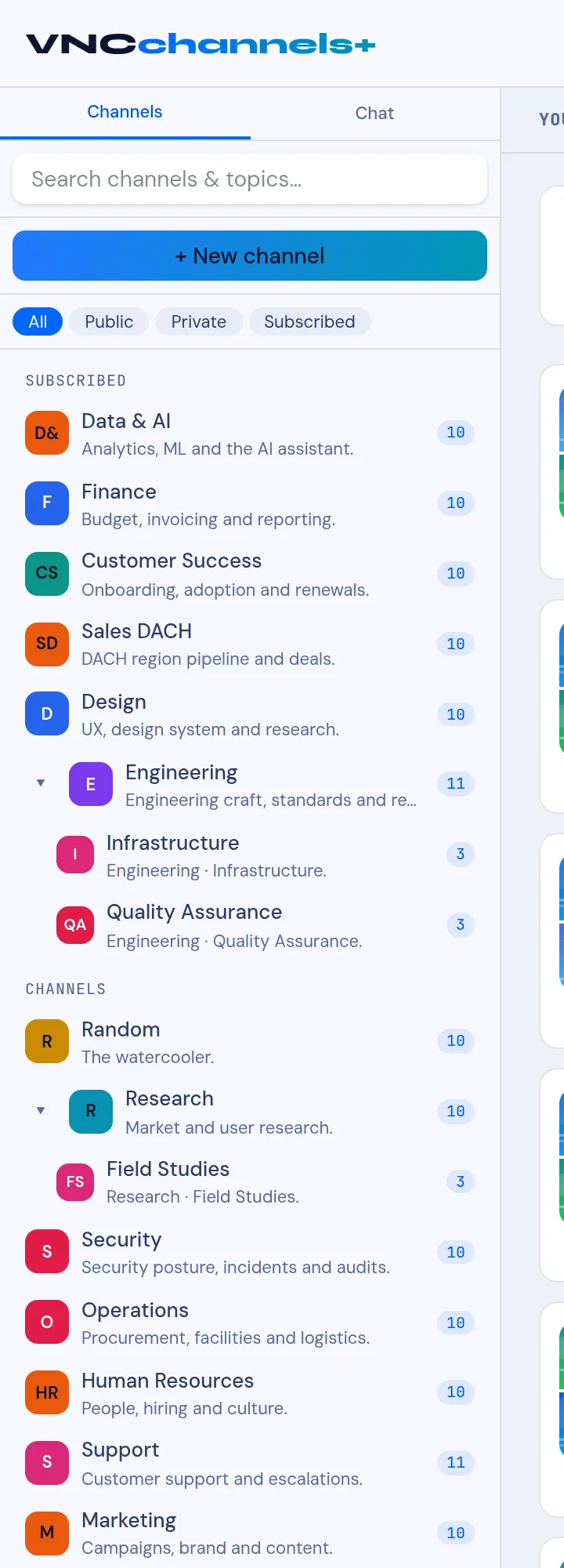
The VNCchannels+ sidebar (left) is how you find a channel and its topics. The main area shows the selected channel’s topics.
Channels / Chat
Section titled “Channels / Chat”The two tabs at the top switch between Channels (the knowledge base — topics in channels) and Chat (the quick conversation view shared with VNCchat+). → VNCchannels+ vs VNCchat+
Search
Section titled “Search”Search channels & topics… finds a channel or a topic by name or text. → Search channels and topics
New channel
Section titled “New channel”+ New channel creates a channel — a space with a purpose (and optional subchannels). → Create a channel · Organize subchannels
Filters
Section titled “Filters”All, Public, Private, Subscribed narrow the list below to the channels you can see, or only those you follow. → Subscribe to, or mute, a channel
The channel list
Section titled “The channel list”Grouped into SUBSCRIBED (channels you follow) and CHANNELS (the rest you can see). Each row shows the channel’s icon, name, one-line description, and a count (topics, or unread). Expand a parent with the chevron to see its subchannels (for example Engineering › Infrastructure, Quality Assurance).
Open a channel to read and write its topics. → Browse channels and read a topic · The channel view · Channel details and settings