Filter and search tasks
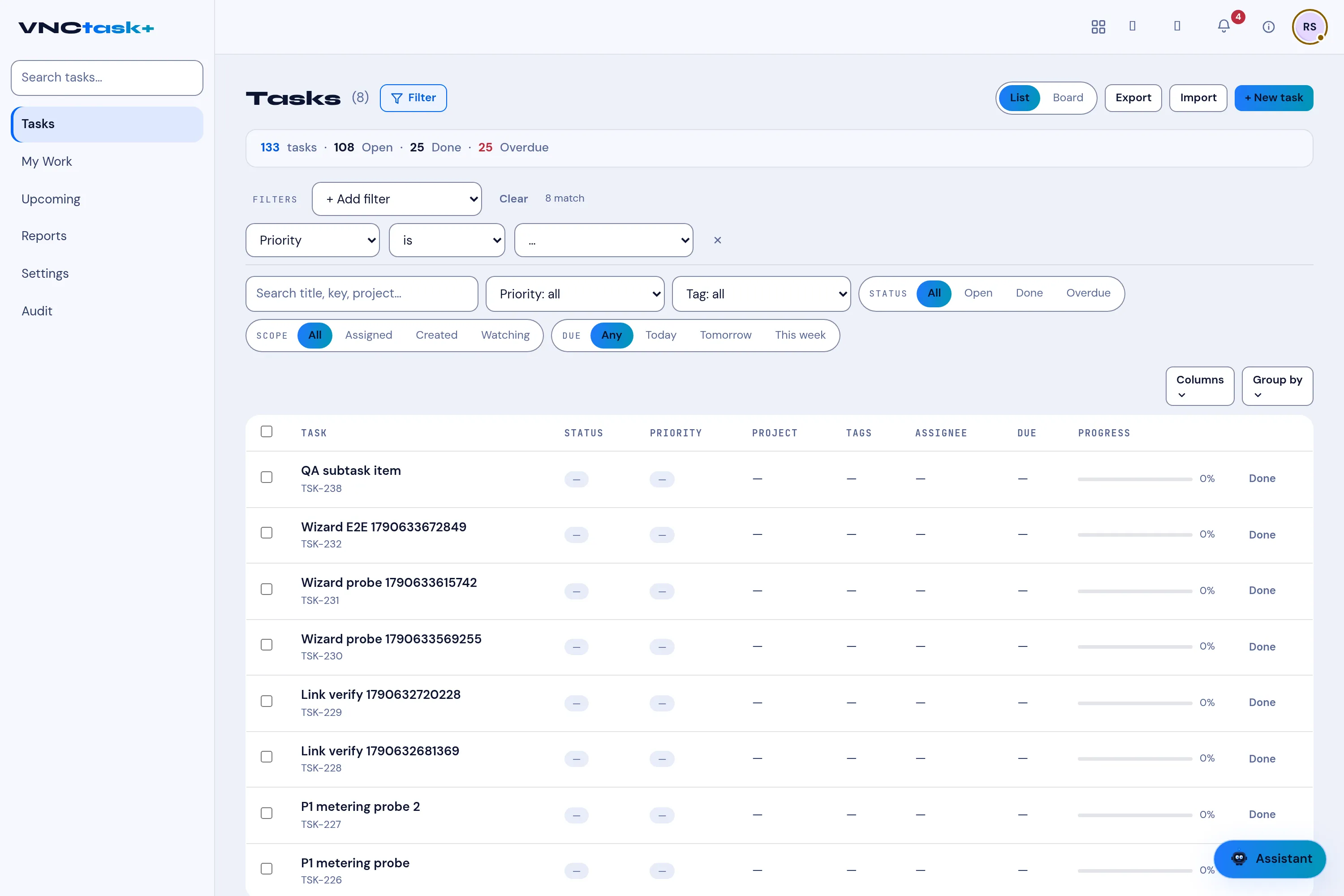
The Tasks list can be searched, filtered and grouped, and switched between a list and a board. A summary line shows the totals.
Search
Section titled “Search”Type in the search box (or press /) to find tasks by title, key, project or tag.
Quick filters
Section titled “Quick filters”Right below the search box, narrow the list in one click:
- Status — All, Open, Done, Overdue.
- Scope — All, Assigned, Created, Watching.
- Due — Any, Today, Tomorrow, This week.
- the Priority and Tag menus.
Build a filter rule
Section titled “Build a filter rule”- Select Filter.
- Select + Add filter, then choose a field (for example Priority).
- Choose an operator (for example is) and a value.
- Add more rules if you like — they all must match. The row shows how many tasks match.
- Remove a rule with its ×, or select Clear to remove them all.
See Filters and grouping reference for every field and operator.
Group and choose columns
Section titled “Group and choose columns”- Group by stacks the list by one or more fields.
- Columns chooses which fields are shown.
Switch view or export
Section titled “Switch view or export”- Switch between List and Board with the toggle.
- Export / Import for CSV round-trips.
- Select + New task to add one, or open a row to edit it.
Result
Section titled “Result”The list updates to match. Overdue tasks and their due dates appear in red so they stand out.