The Calendar Agenda card
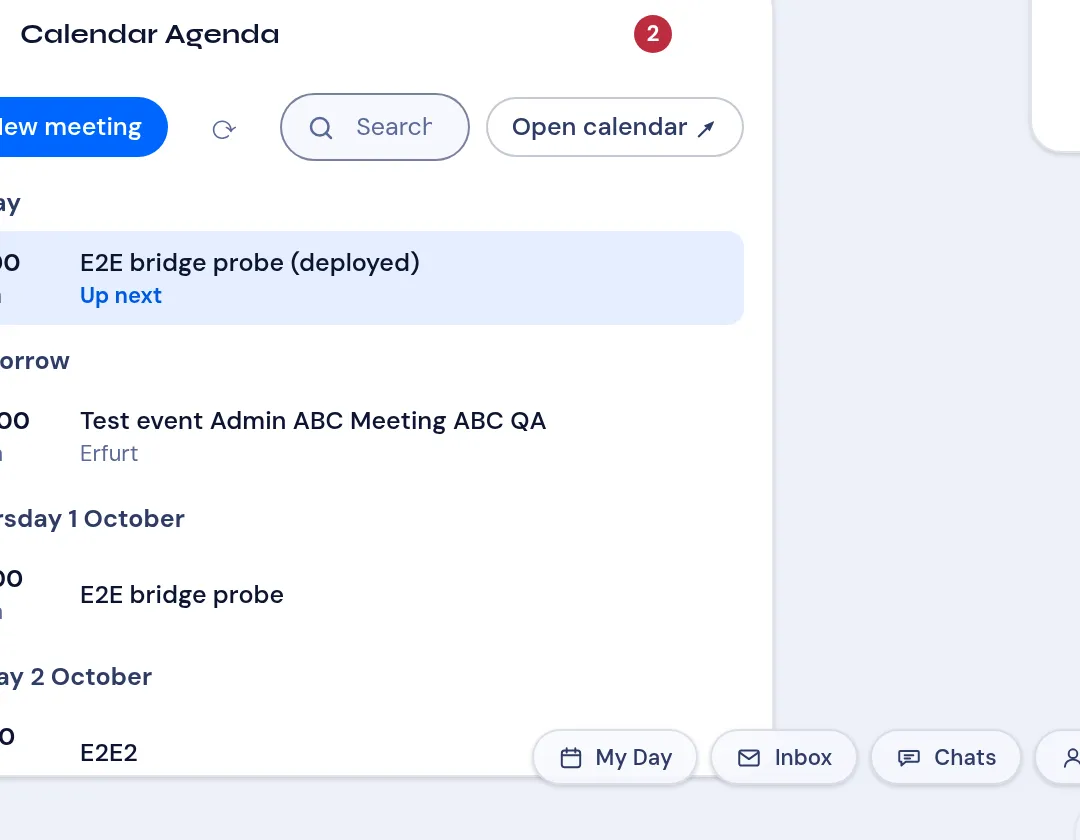
The Calendar Agenda card puts your VNCmail+ calendar on My Day, so the next meeting is always in front of you without opening the calendar.
What it shows
Section titled “What it shows”- Events grouped by day — Today, Tomorrow, then each day’s name and date.
- Each event with its start time and duration, and its location when set.
- The event that is running now (or starts next) is highlighted with Up next.
- A badge in the card header counts how many events start in the next 24 hours.
What you can do
Section titled “What you can do”| Control | What it does |
|---|---|
| New meeting | Open the VNCmail+ calendar composer to create an event. |
| refresh (↻) | Reload the agenda. |
| Search | Filter the listed events. |
| Open calendar ↗ | Jump to the VNCmail+ calendar. |
| Click an event | Open the event peek — detail, Join link, attendees and a deep link into VNCmail+. |
Add the card
Section titled “Add the card”- Open the Portlet catalog (the grid icon in the top bar).
- Under VNCmail+, select Add next to Calendar Agenda.
- Drag the card to where you want it — the layout is saved for you.